Timegrapher Readings Explained: Amplitude, Beat Error & What’s Normal
 Quick Answer
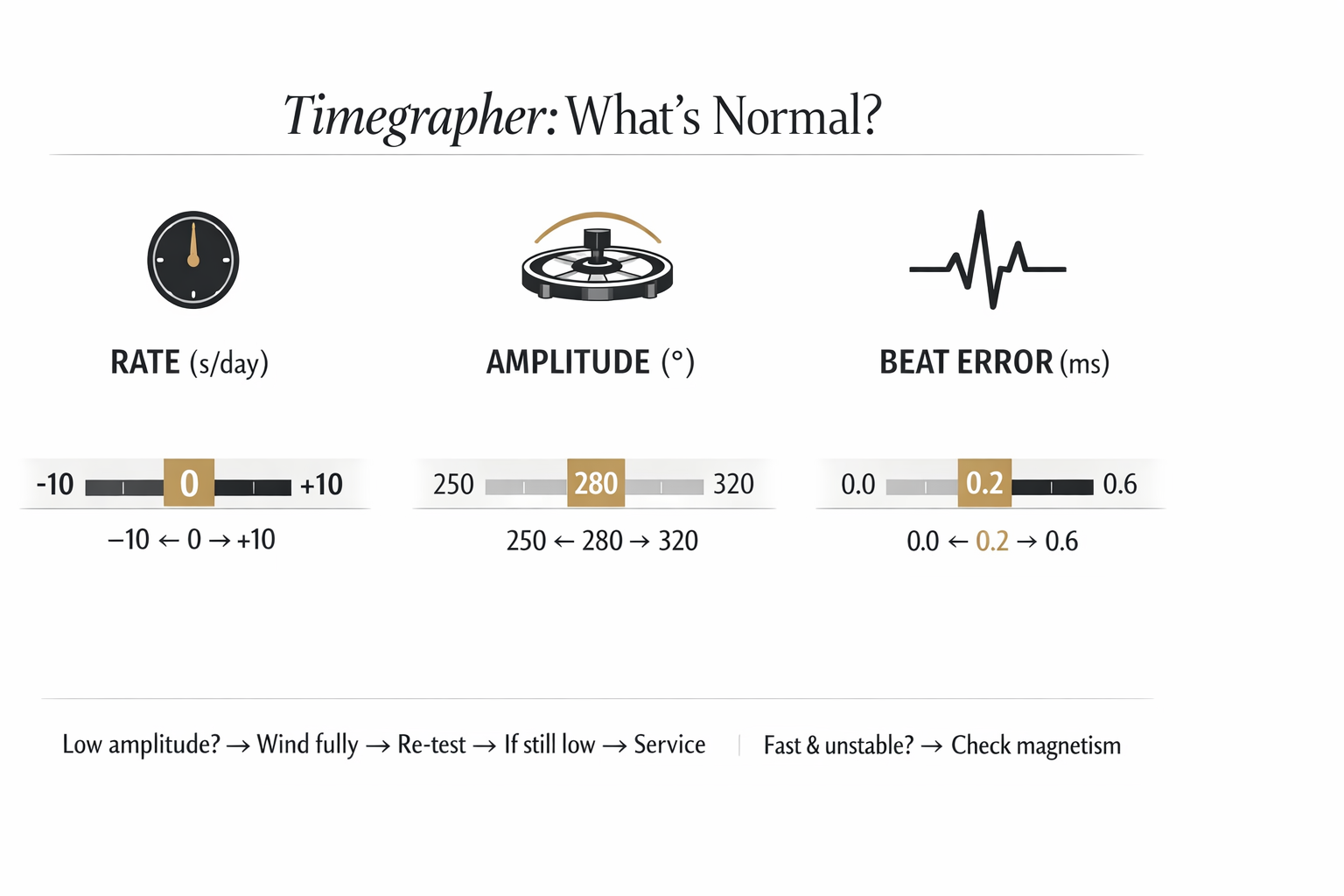
A timegrapher mainly shows three numbers:
- Rate (seconds per day): how fast/slow the watch runs
- Amplitude (degrees): how strong the balance wheel swings (movement “health/energy”)
- Beat Error (ms): how evenly the tick and tock are spaced
If your readings look “bad,” don’t panic—many issues come from low wind or magnetism, not immediate failure.
Set your watch precisely before testing:
→ Hacking Seconds Explained: How to Set Time Precisely (and When It Matters)
1) What a timegrapher measures (plain English)
A timegrapher “listens” to the watch and estimates:
- how consistently it ticks
- how strongly the balance is swinging
- whether tick and tock are symmetrical
It’s a useful diagnostic tool—but it does not replace real-world wear testing.
2) The 3 key numbers (and what they mean)
A) Rate (s/day)
- +10 s/day means it gains 10 seconds in 24 hours
- −10 s/day means it loses 10 seconds in 24 hours
If you’re trying to understand why your watch runs fast or slow, start here:
→ Why Is My Watch Running Fast or Slow? 9 Common Causes (And Fixes)
B) Amplitude (°)
Amplitude is the balance wheel’s swing angle. Think of it as “how much energy is reaching the balance.”
- Higher amplitude usually means healthier power delivery
- Low amplitude can mean low wind, friction, or service needs
C) Beat Error (ms)
Beat error describes how evenly spaced the tick and tock are.
- Smaller is better
- Big beat error can indicate the watch is “out of beat” (adjustment issue), not necessarily worn out
3) What’s “normal”? (quick ranges)
These are practical ranges for many modern mechanical watches. Your model can differ.
Quick table
| Metric | Good / Normal | Caution | Often Needs Attention |
|---|---|---|---|
| Rate | within a few seconds/day to ~±10 s/day (depends on expectations) | ±10–20 s/day | large or unstable swings |
| Amplitude (dial up/down) | ~250°–320° | ~220°–250° | < ~220° consistently |
| Beat error | ~0.0–0.6 ms | ~0.6–1.0 ms | > ~1.0 ms |
Important: amplitude depends on factors like wind level, position, and lift angle (see below).
Accuracy standards context (COSC vs METAS):
→ Watch Accuracy Standards Explained: COSC vs METAS (What the Numbers Really Mean)
4) Before you trust the numbers: 3 setup checks
Check 1 — Fully wind the watch
Low wind = low amplitude.
Winding guide:
→ How to Wind a Mechanical Watch Properly (Manual vs Automatic + Mistakes to Avoid)
If your watch stops early, read:
→Power Reserve Explained: Why Your Watch Stops Early (and How to Fix It)
Check 2 — Magnetism
Magnetism can cause odd rate behavior and instability.
Symptoms:
→ Magnetized Watch Symptoms: Why Your Watch Runs Fast & How to Fix It (Safely)
At-home demagnetizing:
→ How to Demagnetize a Watch at Home (Tool, Steps & When to Stop)
Check 3 — Lift angle (if your timegrapher requires it)
Wrong lift angle can make amplitude look “wrong.”
If you don’t know it, use the manufacturer info if possible (many users start with common defaults, but accuracy varies).
5) What low amplitude usually means (and what to do)
If amplitude is low but rate is stable:
Most common causes:
- not fully wound (automatic worn lightly)
- friction from old oils / dirty movement
- mainspring or winding efficiency issues
What to try first:
- fully wind and re-test
- test in multiple positions (dial up, dial down)
- demagnetize if rate is erratic
If it stays low after proper winding, consider service:
→ How Often Should You Service a Mechanical Watch? A Practical Maintenance Timeline
6) What high beat error means
High beat error often means the movement is out of beat (adjustment issue). It can run “okay” but it’s not ideal long-term.
When to stop DIY:
- beat error stays high across positions
- rate becomes unstable
- you also have low amplitude
Service reference:
→ How Often Should You Service a Mechanical Watch? A Practical Maintenance Timeline
7) A simple “home test plan” (fast, practical)
Step 1 — Set time precisely
→ https://www.globalwatchindustry.com/blogs/hacking-seconds-explained-how-to-set-time-precisely
Step 2 — Wind properly, then timegrapher test (2–3 positions)
→ https://www.globalwatchindustry.com/blogs/how-to-wind-mechanical-watch-properly
Step 3 — If rate is wildly fast: check magnetism
→ Magnetized Watch Symptoms: Why Your Watch Runs Fast & How to Fix It (Safely)
→ How to Demagnetize a Watch at Home (Tool, Steps & When to Stop)
Step 4 — Compare with real wear over 2–3 days
If timegrapher looks OK but real wear is bad, position and lifestyle are often the cause:
→ Why Is My Watch Running Fast or Slow? 9 Common Causes (And Fixes)
8) When a timegrapher points to servicing
Consider service if:
- amplitude remains low even fully wound
- beat error is consistently high
- rate is unstable across positions
- the watch used to be better and suddenly changed
Service guide:
→ How Often Should You Service a Mechanical Watch? A Practical Maintenance Timeline
FAQ
1) What is a normal amplitude for a mechanical watch?
Often ~250°–320° dial up/down, but it varies by movement and lift angle.
2) What is a good beat error?
Many people aim under ~0.6 ms; under 1.0 ms is often acceptable depending on the watch.
3) My amplitude is low—does it always need service?
Not always. First ensure the watch is fully wound and magnetism is ruled out.
4) Does magnetism change timegrapher readings?
Yes—magnetism can cause fast running and instability.
→ Magnetized Watch Symptoms: Why Your Watch Runs Fast & How to Fix It (Safely)
5) Why does rate change by position?
Gravity affects friction and balance behavior; mechanical watches often vary by position.
6) How do I compare before/after demagnetizing?
Take a reading, demagnetize, then re-test under the same conditions.
→ How to Demagnetize a Watch at Home (Tool, Steps & When to Stop)
Recommended reading
- Watch Accuracy Standards Explained: COSC vs METAS (What the Numbers Really Mean)
- Hacking Seconds Explained: How to Set Time Precisely (and When It Matters)
- Why Is My Watch Running Fast or Slow? 9 Common Causes (And Fixes)
- Magnetized Watch Symptoms: Why Your Watch Runs Fast & How to Fix It (Safely)
- How to Demagnetize a Watch at Home (Tool, Steps & When to Stop)
- How to Wind a Mechanical Watch Properly (Manual vs Automatic + Mistakes to Avoid)
- Power Reserve Explained: Why Your Watch Stops Early (and How to Fix It)
- How Often Should You Service a Mechanical Watch? A Practical Maintenance Timeline
- 10 Watch Care Mistakes That Ruin Your Watch Faster Than You Think
- How to Store Watches Properly When Not Wearing Them