Moonphase Setting Guide: How to Set a Moonphase Watch Safely (Avoid Common Damage)
 Short Answer (Read this first)
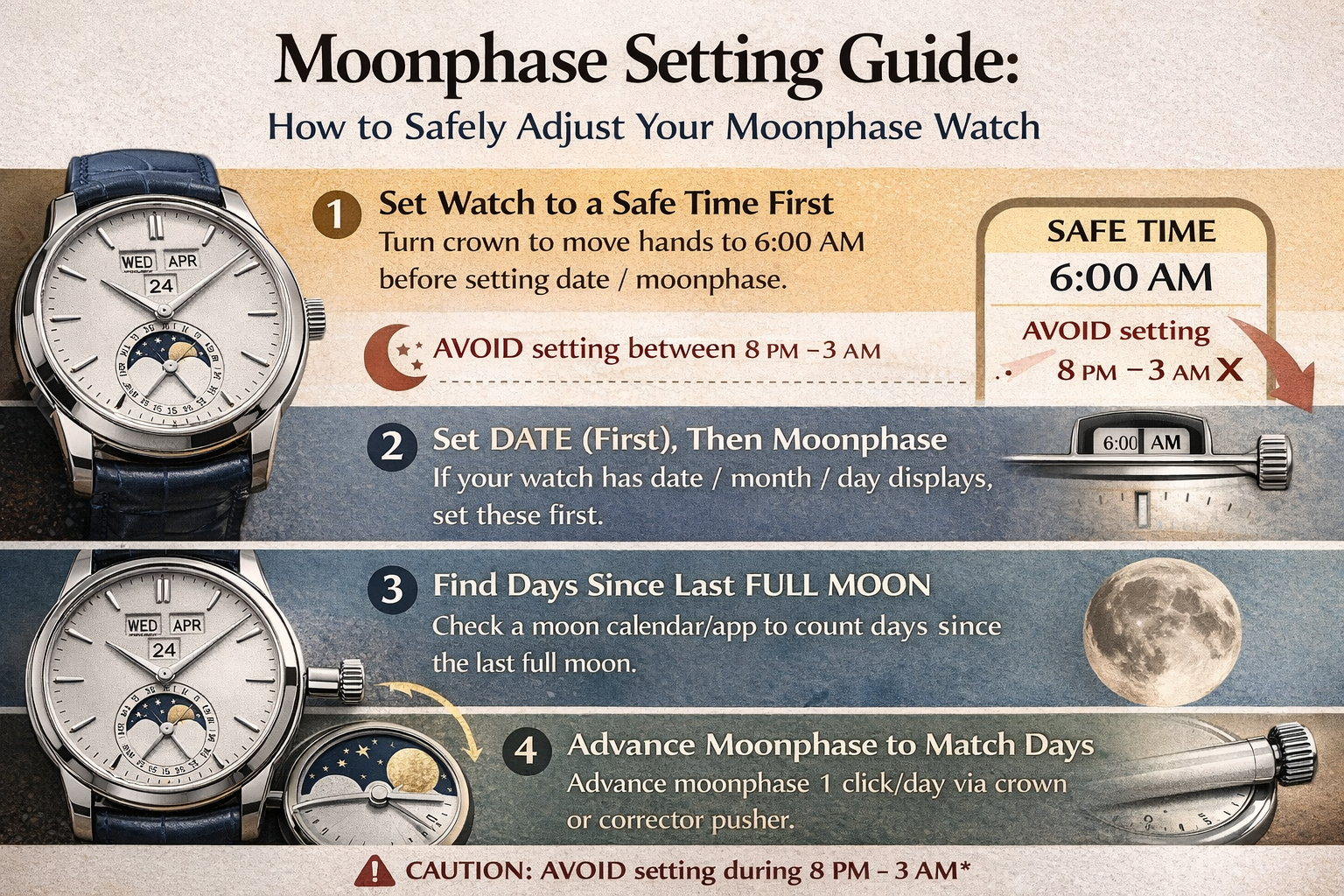
To set a moonphase watch safely: move the time out of the “danger window” first, set the date/day/month (if your watch has them), then set the moonphase using the crown or corrector. Many watches should not be quick-set during roughly 8 PM–3 AM (varies by movement) because the calendar mechanism may be engaged. When in doubt, set everything around 6:00 AM to reduce risk.
To delve deeper into the "principles/mechanisms" of lunar phases:
→ Celestial Ballet on the Wrist: The Poetic Mechanics of the Moon Phase Complication
Step 0: Identify how your moonphase adjusts
Moonphase watches commonly adjust in one of these ways:
Type A) Crown adjustment (common)
-
Pull crown to a position where moonphase advances with crown turns.
Type B) Corrector pusher (also common)
-
A small recessed pusher on the case side advances moonphase by 1 day per press.
Type C) Integrated calendar (annual/perpetual + moonphase)
-
Moonphase is part of a larger calendar system; setting order matters more.
If you’re not sure which type you have, check the manual—because forcing the wrong setting method is how damage happens.
Step 1: Move the watch to a safe time first
Before changing date/day/month/moonphase, set the time to a “safe zone.”
Recommended safe time: 6:00 AM (or any time safely away from late evening/early morning)
Avoid (common danger window): ~8 PM to ~3 AM (varies by watch)
Why: around midnight, many watches begin engaging the calendar change mechanism.
Related “don’t damage your watch” habits:
→ 10 Watch Care Mistakes That Ruin Your Watch Faster Than You Think
Step 2: Set the date/day/month first (if your watch has them)
With the time parked at a safe hour:
-
Set date/day/month via crown (or correctors) to the correct values.
-
If your watch has both day and date, confirm AM/PM is correct (so you don’t end up 12 hours off).
If your watch is a more complex mechanical piece, a practical maintenance reference:
→ How Often Should You Service a Mechanical Watch? A Practical Maintenance Timeline
Step 3: Find the last full moon (you need one number)
To set moonphase accurately, you need either:
-
the date/time of the most recent full moon, or
-
your current moon age (days since last full moon)
Easy method: check a moon phase calendar/app and note the last full moon date.
Step 4: Set the moonphase (two safe methods)
Method 1 (Most reliable): Set to “full moon,” then advance to today
-
Set the moonphase display to Full Moon (centered full moon image).
-
Count how many days have passed since the last full moon.
-
Advance moonphase one day per click/press/turn until it matches the correct moon age.
Example: last full moon was 10 days ago → advance moonphase 10 steps.
Method 2 (If your watch provides a moon age reference)
Some watches or manuals give direct “moon age” alignment. If yours does, follow it—but still do it in the safe time window.
Step 5: Set the time to the current time (last step)
After date + moonphase are correct:
-
Set the current time and confirm AM/PM
-
Push crown back in and (if screw-down) tighten it properly
Storage tip if you rotate watches (moonphase stops often):
→ How to Store Watches Properly When Not Wearing Them
Common mistakes (and how to avoid them)
Mistake #1: Adjusting moonphase during the danger window
This is the #1 way people damage calendar works. Always move time to a safe hour first.
Mistake #2: Using a metal tool on corrector pushers
Use a proper plastic tool (or a toothpick) to avoid scratching the case.
Mistake #3: Forcing the crown when it feels “blocked”
Stop immediately—this is how gears get damaged.
Mistake #4: Trying to “go backwards”
Some moonphase systems should only be advanced forward. If you overshoot, it’s often safer to continue forward rather than reverse (depends on movement).
Troubleshooting
My moonphase is “one day off”
-
Being off by 1 day is common if your reference full moon time zone differs.
-
You can advance or correct by 1 step (in the safe window).
My moonphase looks wrong after the watch stopped
If the watch stopped, moonphase will be wrong again. Repeat the method: safe time → calendar → moonphase → final time.
FAQ
1) When is it safe to set a moonphase watch?
A safe rule is around 6:00 AM, away from the typical calendar engagement window. Avoid ~8 PM–3 AM unless your manual says otherwise.
2) Can setting the moonphase damage my watch?
Yes, if you set it during the engagement window or force the mechanism. Done correctly, it’s safe.
3) How do I calculate days since the last full moon?
Use a moon phase calendar/app to find the last full moon date, then count days to today.
4) Should I set the date first or the moonphase first?
Set date/day/month first, then set moonphase, then set current time last.
5) My moonphase has a corrector button—how many presses?
Typically 1 press = 1 day. Press the number of days since the last full moon (or until aligned).
6) How often does a moonphase need servicing?
Moonphase is usually serviced as part of normal movement service.
→ How Often Should You Service a Mechanical Watch? A Practical Maintenance Timeline
Related reading recommendations
-
Celestial Ballet on the Wrist: The Poetic Mechanics of the Moon Phase Complication
-
Weekly Watch Care Routine: A Simple 10‑Minute System to Extend Your Watch’s Life
-
https://www.globalwatchindustry.com/blogs/-mechanical-watch-service-interval-
-
Weekly Watch Care Routine: A Simple 10‑Minute System to Extend Your Watch’s Life