GMT Watch Explained: How to Set & Use a GMT Hand (2nd & 3rd Time Zone Guide)
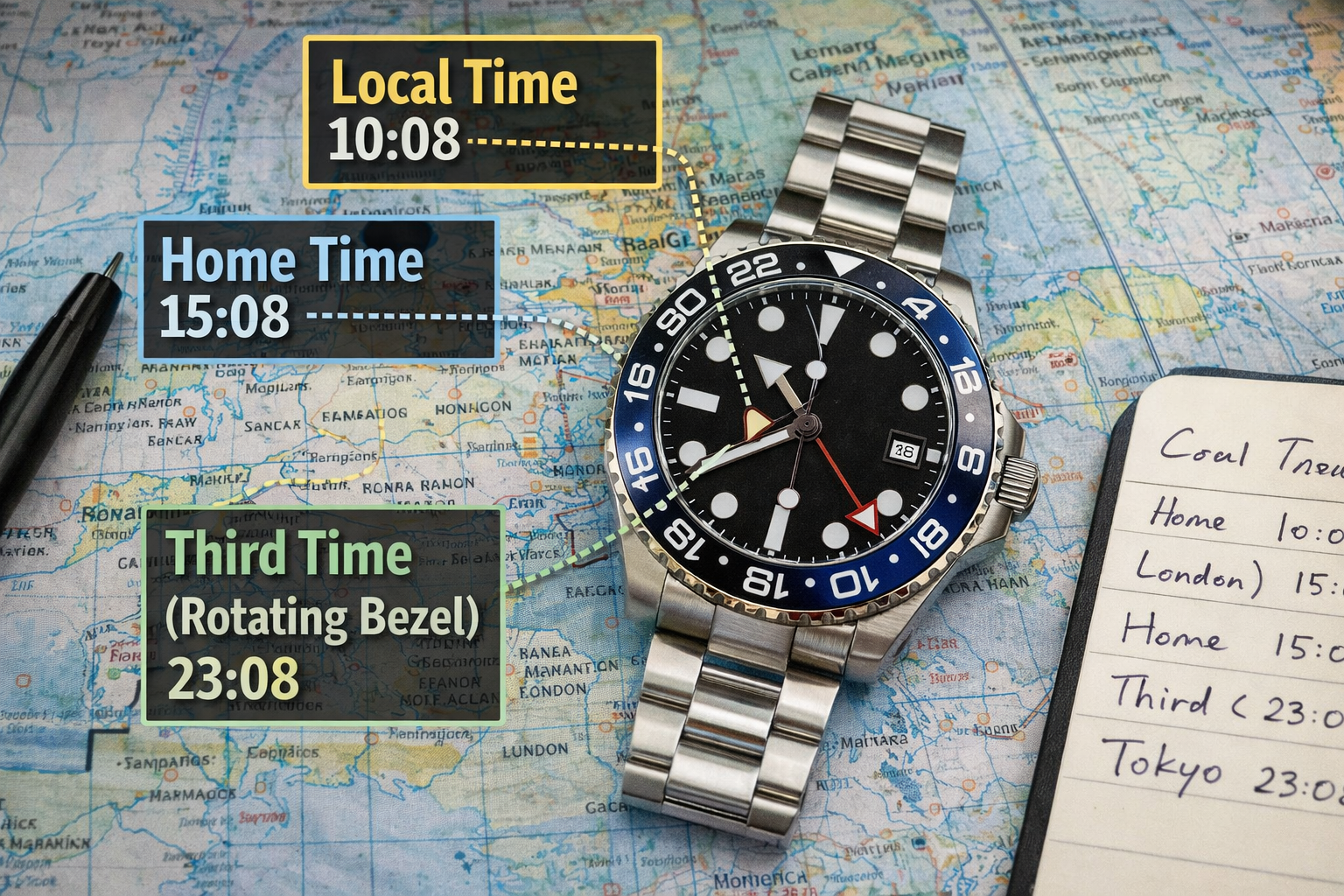 A GMT watch lets you track two time zones at once (local time + a second time zone) using a 24-hour GMT hand. If your GMT watch has a rotating 24-hour bezel, you can track a third time zone too. The safest setup is: set the 24-hour GMT hand to “home time”, then use the main hands for local time when traveling.
What is a GMT watch (and what the GMT hand does)?
A GMT watch has an extra hand that makes one full rotation every 24 hours (instead of 12). It points to a 24-hour scale—either printed on the dial chapter ring or on a 24-hour bezel—so you can read another time zone in “military time” (e.g., 18 = 6 PM).
Traveler GMT vs Caller GMT (important difference)
Not all GMT watches set the same way. Two common types:
1) Traveler (Flyer) GMT
-
The local hour hand jumps in 1-hour steps (perfect for travel).
-
The GMT hand stays on home time.
2) Caller GMT
-
The GMT hand jumps in 1-hour steps (great for calling another country).
-
The main hour hand behaves like a normal watch.
If you’re not sure which one you have:
-
If you can jump the local hour hand forward/back by 1 hour without stopping the watch, it’s likely a Traveler GMT.
-
If the GMT hand jumps by 1 hour instead, it’s likely a Caller GMT.
How to read a GMT watch (2 time zones)
Example setup (recommended)
-
Main hands = local time
-
GMT hand = home time (24-hour)
To read home time: Look at where the GMT hand points on the 24-hour scale.
-
If it points to “22”, your home time is 10 PM.
How to set a GMT watch safely (general step-by-step)
Different movements vary, so treat this as a general guide. If you have a manual, follow it first.
Step 1) Wind the watch (if needed)
Make sure the watch has enough power reserve so it doesn’t stop mid-setting.
Good daily care habits help avoid setting issues:
→ Everyday Watch Care Guide: How to Keep Your Watch Looking New
Step 2) Avoid the “date-change danger window”
Many mechanical watches begin engaging the date mechanism roughly between 9 PM and 3 AM. Setting the date/GMT during that window can cause problems on some watches.
Safe habit: set the time to about 6:30 first, then do date/GMT adjustments, then set final time.
Service/maintenance reference (if your date feels stiff or inconsistent):
→ How Often Should You Service a Mechanical Watch? A Practical Maintenance Timeline
Step 3) Set the GMT hand to home time (24-hour)
-
Set the GMT hand so it matches your home time in 24-hour format.
Step 4) Set local time (especially for travelers)
-
If you have a Traveler GMT: jump the local hour hand to local time.
-
If you have a Caller GMT: set local time with main hands, then adjust GMT hand for your second zone.
Step 5) Set the date (if your model links date to local hour hand)
Many traveler GMTs change the date when you jump the local hour hand past midnight.
How to track a third time zone (with a rotating 24-hour bezel)
If your GMT bezel rotates:
-
Keep GMT hand on home time
-
Keep main hands on local time
-
Rotate the bezel so the GMT hand points to the third-zone hour on the bezel’s 24-hour scale.
Tip: Third-zone tracking is easiest if the third zone is a whole-hour offset.
Common GMT mistakes (and how to avoid them)
Mistake 1: Confusing AM/PM on the second time zone
The whole point of 24-hour scale is to avoid this—always read the GMT hand on 24h.
Mistake 2: Setting date/GMT when the watch is mid date-change
Use the “safe window” habit (set away from late-night hours first).
Mistake 3: Using the bezel like a dive timer (wrong tool)
A 24-hour bezel is for hours, not minutes.
Mistake 4: Over-adjusting and forcing the crown
If anything feels gritty or overly resistant, stop and service/check it.
Maintenance timeline:
→ How Often Should You Service a Mechanical Watch? A Practical Maintenance Timeline
When a GMT watch is worth it (and when it isn’t)
A GMT is perfect if you:
-
travel across time zones
-
work with overseas teams
-
want home time always visible
If you don’t travel/call much, a simple three-hand watch may be simpler and cheaper to maintain.
For broader “care + ownership” habits:
→ Weekly Watch Care Routine: A Simple 10‑Minute System to Extend Your Watch’s Life
FAQ
1) What’s the difference between a GMT and a world timer?
GMT tracks 2–3 zones using one extra hand (and sometimes a bezel). A world timer is designed to show many time zones at once using a city ring.
2) Can I use a GMT to track daylight saving time?
Yes, but you must manually account for DST shifts if the second zone changes and your home zone doesn’t (or vice versa).
3) Does every GMT have a rotating bezel?
No. Many GMT watches have a fixed 24-hour scale (still tracks 2 zones, but third-zone tracking is harder).
4) My GMT hand is off by a few minutes—normal?
It depends on the movement. Some GMT hands are geared to hour jumps; if alignment is consistently off or worsening, it may need regulation/service.
→How Often Should You Service a Mechanical Watch? A Practical Maintenance Timeline
5) Should I keep the GMT hand on home time or local time?
Most travelers keep GMT on home time and use main hands for local time. If you rarely travel, set GMT to the zone you call most.
6) Can I damage my watch by setting GMT the wrong way?
If you set during the date-change engagement window or force the crown, you can cause issues. Use the safe-setting habit and gentle operation.
Related Guides
-
Everyday Watch Care Guide: How to Keep Your Watch Looking New
-
Weekly Watch Care Routine: A Simple 10‑Minute System to Extend Your Watch’s Life
- How Often Should You Service a Mechanical Watch? A Practical Maintenance Timeline
-
Celestial Ballet on the Wrist: The Poetic Mechanics of the Moon Phase Complication