Day-Date & Triple Calendar Setting Guide: Safe Order, Danger Zone & Common Mistakes
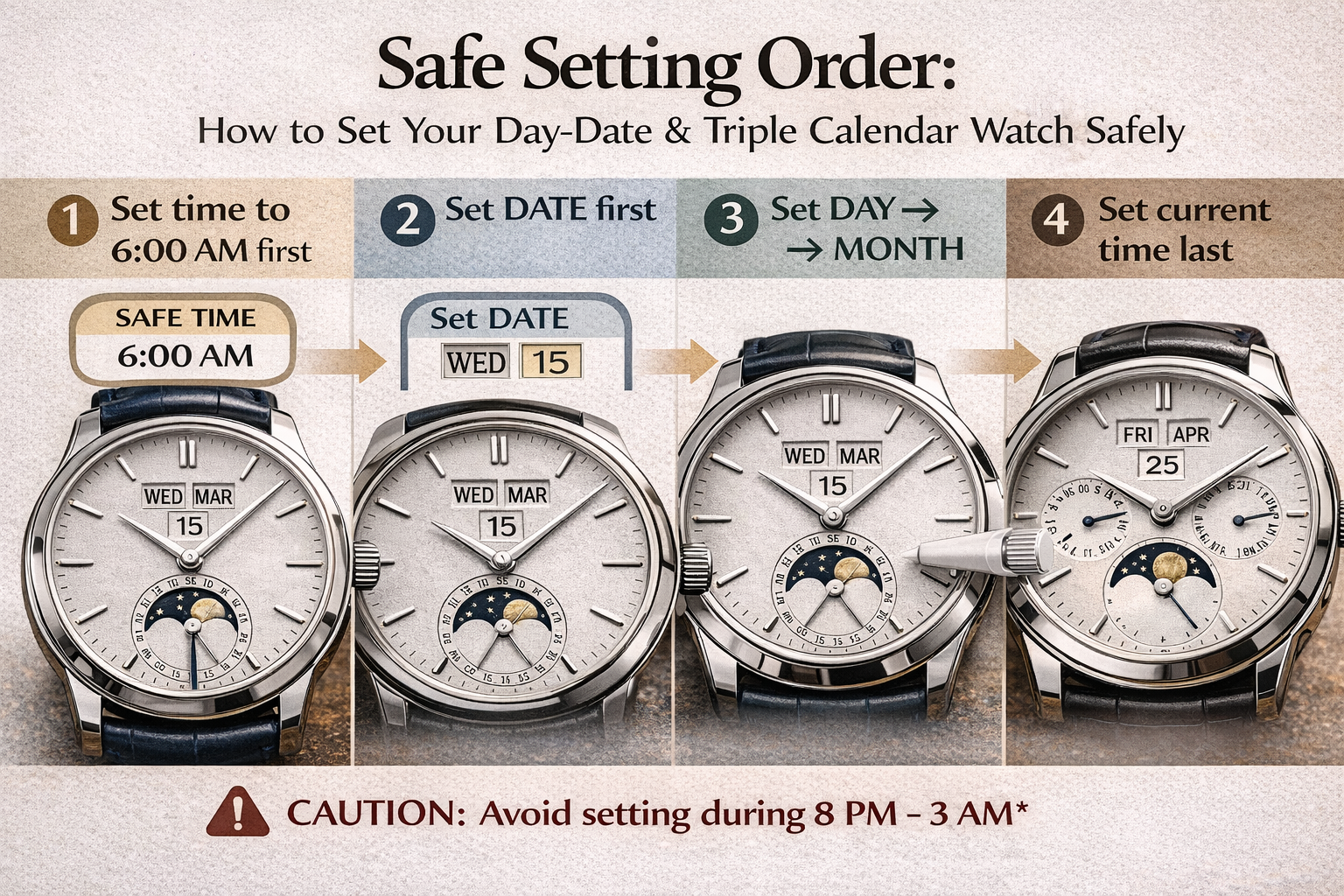 To set a Day-Date or Triple Calendar safely, move the time to a safe hour first (e.g., 6:00 AM), then set date/day/month in a careful order, and set the current time last. Avoid quick-setting the calendar during the common “danger window” (often around 8 PM–3 AM, but it varies by movement). When in doubt, set everything around 6:00 AM.
1) Know what you have: Day-Date vs Triple Calendar vs Full Calendar
Day-Date
Shows Day + Date (e.g., “WED 24”).
Triple Calendar
Shows Day + Date + Month (sometimes plus a pointer date).
Full Calendar
Often means Triple Calendar + Moonphase.
You already have a moonphase deep-dive article here (background/meaning):
→ Celestial Ballet on the Wrist: The Poetic Mechanics of the Moon Phase Complication
2) The “danger window” (why calendar watches can be damaged)
Many mechanical watches begin engaging the calendar change mechanism in the late evening hours. During that time, forcing quick-set changes can stress gears and levers.
Practical rule:
-
✅ Safest: set everything around 6:00 AM
-
⚠️ Avoid quick-set during roughly 8 PM–3 AM (varies—check your manual if available)
If you want a general “avoid doing things that ruin watches” reference:
→ Weekly Watch Care Routine: A Simple 10‑Minute System to Extend Your Watch’s Life
3) Universal safe order (works for most calendar watches)
-
Set time to a safe hour first (6:00 AM)
-
Set date
-
Set day
-
Set month (if you have it)
-
Set current time last (confirm AM/PM)
Why “date first”? Many watches use date as the “base” calendar element. Day/month often follow the date system.
A) How to set a Day-Date watch (step-by-step)
Step A1 — Park the time safely
Set the hands to 6:00 AM first.
Step A2 — Set the date
Use the quick-set (crown position) to set the correct date.
Pro tip: If you’re unsure whether you’re in AM or PM, use this method:
-
Set date to yesterday, then advance time forward through midnight until the date flips—now you know you’re aligned to the correct day change.
Step A3 — Set the day
-
Some watches quick-set the day by turning the crown the opposite direction.
-
Some change the day only by advancing time through 24-hour cycles.
If your watch has bilingual day (e.g., ENG/SPA): cycle day until the correct language/day appears.
Step A4 — Set current time (last)
Set the current time and ensure AM/PM is correct.
B) How to set a Triple Calendar (day/date/month) watch
Triple calendars commonly use corrector pushers (small recessed buttons) for month/day, or a combination of crown + correctors.
Step B1 — Safe time first
Set to 6:00 AM.
Step B2 — Set the date (base)
Set the date first (quick-set via crown or corrector).
Step B3 — Set day and month
-
If month is set by a corrector pusher: press one step at a time until correct.
-
If day is set by corrector: same approach.
Tool tip: Use a proper plastic stylus/toothpick—avoid metal tips that scratch the case.
Step B4 — Final time last
Set the current time, confirm AM/PM, done.
C) Full Calendar (Triple Calendar + Moonphase): safest approach
-
Safe time (6:00 AM)
-
Date → Day → Month
-
Moonphase (last among complications)
-
Current time last
Moonphase theory article you have:
→ Celestial Ballet on the Wrist: The Poetic Mechanics of the Moon Phase Complication
4) What to do if you overshoot (common situations)
If you overshoot the date by 1–2 days
Most watches: keep going forward (don’t force reverse quick-set unless the manual explicitly allows it).
If you overshoot the month
Use the month corrector to advance forward (or keep cycling carefully).
If you’re totally lost (safe reset method)
-
Move time to 6:00 AM
-
Set date to yesterday
-
Advance time forward until the date flips at midnight
-
Now set day/month correctly
-
Set the actual current time
5) When to stop and see a watchmaker
Stop setting and get help if:
-
the crown feels blocked or gritty during quick-set
-
corrector buttons feel jammed
-
the calendar changes at noon instead of midnight (AM/PM misalignment can indicate deeper issues)
-
you have a perpetual/very complex calendar and you’re unsure
Service timeline reference (general):
→ How Often Should You Service a Mechanical Watch? A Practical Maintenance Timeline
FAQ
1) When is it safe to set the day/date on a mechanical watch?
A safe rule is around 6:00 AM. Avoid the common danger window 8 PM–3 AM unless your manual says otherwise.
2) Should I set date first or day first?
Set date first, then day, then month. Set current time last.
3) Why did my day/date change at noon?
AM/PM alignment is off. Set date to yesterday, then advance time through midnight to re-sync.
4) Can I damage my watch using the corrector pushers?
Yes if you use force or a sharp tool. Use gentle presses and a plastic stylus.
5) My watch has day/date/month and moonphase—what order?
Safe time → date/day/month → moonphase → final time.
6) How often do calendar watches need service?
Calendar watches are mechanical systems; service intervals vary, but a conservative plan is smart.
→ How Often Should You Service a Mechanical Watch? A Practical Maintenance Timeline